Noether — Type-safe Composition for AI Agents
When your AI coding assistant needs to build a data pipeline, it writes Python from scratch every time. 300 tokens for a CSV parser. 500 tokens for an API call + JSON extraction. Each time, from zero — no reuse, no type safety, no guarantee the code is correct until it runs.
Noether is different. Instead of generating code, it composes pre-built, typed stages into pipelines. The type checker validates every connection before anything executes. Stages are reusable — the same csv_parse stage works in every pipeline that needs CSV parsing.
About these demos: Noether core ships with 80+ stdlib stages (text, collections, JSON, CSV, control flow). The analytics, ML, cloud, and visualization stages shown in these demos are available as optional packages from the Noether Stage Registry — 390+ Python stages across 50 libraries (sklearn, PyTorch, boto3, BeautifulSoup, Pillow, and more). Install what you need; the core stays lean.
The Stage Registry (
noether-registry) will be published as open source soon. It includes the full stage catalogue, a hosted HTTP API for remote stage discovery, and a scheduler for recurring pipelines.
Demo 1: What a composition graph looks like
A Noether pipeline is a JSON file called a composition graph. Here's one that reads a CSV file, groups sales by region, sums the revenue, and serializes the result:
{
  "description": "Sales revenue by region",
  "version": "0.1.0",
  "root": {
    "op": "Sequential",
    "stages": [
      {
        "op": "Stage",
        "id": "c8e4f75c...",
        "_comment": "csv_file_group_revenue: Record{path} → Any (read file + parse + group + sum)"
      },
      {
        "op": "Stage",
        "id": "b96bc6ef...",
        "_comment": "json_serialize: Any → Text"
      }
    ]
  }
}
The input is a file path — Noether reads the file, parses the CSV, groups by region, and sums revenue:
$ cat /tmp/sales.csv
name,revenue,region
Acme Corp,450000,US
GlobalTech,280000,EU
DataFlow Inc,520000,US
NordStar,190000,EU
Pacific Systems,340000,APAC
CloudBase,410000,US
SmartGrid,175000,EU
RapidScale,295000,APAC
$ noether run revenue-by-region.json --input '{"path": "/tmp/sales.csv"}'

{
  "ok": true,
  "data": {
    "output": "{\"US\":1380000,\"EU\":645000,\"APAC\":635000}"
  }
}
US: $1.38M. EU: $645K. APAC: $635K. Read from disk, parsed, grouped, and serialized.
Going further — parallel aggregations into an HTML report:
The same CSV file, two aggregations running in parallel, merged into a visual report:
{
  "root": {
    "op": "Sequential",
    "stages": [
      {
        "op": "Parallel",
        "branches": {
          "revenue_by_region": { "op": "Stage", "id": "c8e4f75c...",
            "_comment": "csv_group_revenue: parse CSV + group + sum revenue" },
          "deals_by_region":   { "op": "Stage", "id": "8e5cdc6f...",
            "_comment": "csv_group_deals: parse CSV + count deals per region" },
          "title":             { "op": "Const", "value": "Q4 2025 Sales Report" }
        }
      },
      { "op": "Stage", "id": "ce4a3e2c...",
        "_comment": "html_sales_report: generates HTML with summary cards + bar charts" }
    ]
  }
}
The output is a self-contained HTML page:
┌─────────────────────────────────────────────────┐
│  Q4 2025 Sales Report                           │
│                                                 │
│  ┌──────────┐ ┌──────────┐ ┌──────────┐        │
│  │ Revenue  │ │ Deals    │ │ Regions  │        │
│  │$2,660,000│ │    8     │ │    3     │        │
│  └──────────┘ └──────────┘ └──────────┘        │
│                                                 │
│  Region  Revenue      Deals  Share              │
│  APAC    $635,000     2      ████████           │
│  EU      $645,000     3      █████████          │
│  US      $1,380,000   3      ██████████████████ │
└─────────────────────────────────────────────────┘
Two parallel aggregations + a visual report — all from composing pre-built stages, no pandas, no matplotlib, no code.
Here's a simpler example — counting CSV rows:
{
  "description": "Parse CSV data and count the number of rows",
  "version": "0.1.0",
  "root": {
    "op": "Sequential",
    "stages": [
      {
        "op": "Stage",
        "id": "72cdbe88...",
        "_comment": "csv_parse: Record{text, has_header, delimiter} → List<Map<Text,Text>>"
      },
      {
        "op": "Stage",
        "id": "bb1b2e4d...",
        "_comment": "list_length: List<Any> → Number"
      },
      {
        "op": "Stage",
        "id": "85c780f2...",
        "_comment": "to_text: Any → Text"
      }
    ]
  }
}
Each Stage node references a pre-built, typed function by its content hash (SHA-256). The Sequential operator chains them: the output of csv_parse feeds into list_length, then into to_text.
Type-check it (catches errors before anything runs):
$ noether run --dry-run pipeline.json

{
  "ok": true,
  "data": {
    "type_check": {
      "input":  "Record { delimiter: Null | Text, has_header: Bool | Null, text: Text }",
      "output": "Text"
    },
    "plan": { "steps": 3 }
  }
}
Execute it with real data:
$ noether run pipeline.json \
    --input '{"text": "name,score\nAlice,95\nBob,72\nCarol,88", "has_header": true, "delimiter": null}'

{
  "ok": true,
  "data": {
    "output": "3.0",
    "trace": {
      "duration_ms": 0,
      "stages": [
        { "stage_id": "72cdbe88...", "status": "Ok", "duration_ms": 0 },
        { "stage_id": "bb1b2e4d...", "status": "Ok", "duration_ms": 0 },
        { "stage_id": "85c780f2...", "status": "Ok", "duration_ms": 0 }
      ]
    }
  }
}
3 students, counted in 0ms. Every stage traced. Reproducible — same graph + same input = same output, always.

Demo 2: Type safety catches broken pipelines
Now let's swap the order — feed list_length (which returns a Number) into csv_parse (which expects a Record):
{
  "root": {
    "op": "Sequential",
    "stages": [
      { "op": "Stage", "id": "bb1b2e4d...", "_comment": "list_length: List<Any> → Number" },
      { "op": "Stage", "id": "72cdbe88...", "_comment": "csv_parse: expects Record{text,...}" }
    ]
  }
}
$ noether run --dry-run broken.json

{
  "ok": false,
  "error": {
    "code": "GENERAL_ERROR",
    "message": "type check failed:
      type mismatch at position 0: output Number is not subtype of
      input Record { delimiter: Null | Text, has_header: Bool | Null, text: Text }"
  }
}
The broken pipeline never executes. No wasted compute, no runtime crash, no debugging. The error is caught in under 1ms, before any stage runs.
In traditional code generation, this bug only surfaces at runtime — after the agent writes the code, runs it, reads the traceback, and tries to fix it.

Demo 3: Parallel processing preserves data
When you chain stages sequentially, each one transforms the data — and the original is lost:
The Parallel operator solves this. Here's the graph — 4 branches analyze the same text simultaneously:
{
  "root": {
    "op": "Sequential",
    "stages": [
      {
        "op": "Parallel",
        "branches": {
          "char_count": { "op": "Stage", "id": "3dd4e4c6...", "_comment": "text_length" },
          "uppercased": { "op": "Stage", "id": "1b68a050...", "_comment": "text_upper"  },
          "reversed":   { "op": "Stage", "id": "fbd972ad...", "_comment": "text_reverse" },
          "trimmed":    { "op": "Stage", "id": "bd8e4390...", "_comment": "text_trim"    }
        }
      },
      { "op": "Stage", "id": "b96bc6ef...", "_comment": "json_serialize" }
    ]
  }
}
Every branch receives the full original text. Results merge into a record keyed by branch name:
$ noether run parallel.json --input '"Noether composes typed pipelines for AI agents."'

{
  "ok": true,
  "data": {
    "output": {
      "char_count": 48.0,
      "uppercased": "NOETHER COMPOSES TYPED PIPELINES FOR AI AGENTS.",
      "reversed":   ".stnega IA rof senilpip depyt sesopmoc rehtoN",
      "trimmed":    "Noether composes typed pipelines for AI agents."
    }
  }
}
4 results from 1 input. No data loss. The executor ran them concurrently.

Demo 4: Reuse without duplication
Three different graphs, same building blocks. Here are all three — notice how csv_parse (72cdbe88...) appears in every one:
Pipeline A — count rows:
Pipeline B — export as JSON:
Pipeline C — deduplicate, then count:
$ noether run pipeline-a.json --input '...'    # → "7.0" rows
$ noether run pipeline-b.json --input '...'    # → [{"status":"open",...}, ...]
$ noether run pipeline-c.json --input '...'    # → "6.0" unique rows
| Stage | A | B | C |
|---|---|---|---|
| csv_parse | ✓ | ✓ | ✓ |
| list_length | ✓ | ✓ | |
| to_text | ✓ | ✓ | |
| json_serialize | ✓ | ||
| list_dedup | ✓ |
5 unique stages. 9 total usages. Zero lines of code written.

Demo 5: An AI assistant using Noether
This is a real interaction. The user asks their coding assistant to sort data. Instead of writing Python, the assistant uses noether compose:
User: Sort these students by score and show me the top 3.
What the assistant does:
$ noether compose "sort a list of items by score descending and take the top 3" \
    --input '[{"name":"Alice","score":95},{"name":"Bob","score":72},
              {"name":"Carol","score":88},{"name":"Dave","score":61},
              {"name":"Eve","score":79}]'
What Noether does internally:
- Searches the stage store → finds
list_sort(score: 0.79) andlist_take(score: 0.75) - Sends top 20 candidates + the config pattern to the LLM
- LLM returns a graph with config parameters:
- Type checker validates on first attempt ✓
- Executor merges config with pipeline data and runs it
What the assistant gets back:
{
  "ok": true,
  "data": {
    "output": [
      {"name": "Alice", "score": 95},
      {"name": "Carol", "score": 88},
      {"name": "Eve", "score": 79}
    ],
    "attempts": 1,
    "from_cache": false,
    "trace": { "duration_ms": 0, "stages": 2 }
  }
}
Assistant: The top 3 students by score are Alice (95), Carol (88), and Eve (79).
The LLM generated a graph with config parameters — {"key": "score", "descending": true} and {"count": 3} — on the first attempt. No code written. The pipeline is cached for future use.
The --verbose flag shows the full reasoning:
$ noether compose --verbose "sort a list by score and take top 3"

[compose] Semantic search: "parse CSV data and count rows"
[compose] Found 20 candidates:
   1. 0.790  6aae3697  Sort a list; optionally by a field name
   2. 0.745  e127d8f1  Take the first N elements from a list
   3. 0.718  40f4aa91  Group list items by the value of a named field
   ...

[compose] System prompt: 21146 chars, 20 candidate stages
[compose] LLM call (attempt 1/3, model: gemini-2.5-flash)
[compose] LLM response:
  list_sort(config: {key: "score", descending: true})
  → list_take(config: {count: 3})
[compose] ✓ Type check passed on attempt 1

Demo 7: Analytics Dashboard — Data → Parallel Analyses → HTML Report
A complete analytics pipeline: read sales data, run 4 analyses in parallel, render as an HTML dashboard with bar charts, summary cards, and a data table.
{
  "stages": [
    {"op": "Stage", "id": "json_read"},
    {"op": "Parallel", "branches": {
      "revenue":       {"op": "Stage", "id": "group_sum",   "config": {"group_by": "region", "value": "revenue"}},
      "deals":         {"op": "Stage", "id": "group_count", "config": {"group_by": "region"}},
      "trend":         {"op": "Stage", "id": "group_sum",   "config": {"group_by": "quarter", "value": "revenue"}},
      "top_customers": {"stages": [sort(config: {key: "revenue"}), take(config: {count: 5})]}
    }},
    {"op": "Stage", "id": "html_dashboard", "config": {
      "title": "Q1-Q3 2025 Sales Dashboard",
      "sections": [
        {"title": "Revenue by Region", "type": "bar_chart", "key": "revenue"},
        {"title": "Deals by Region",   "type": "summary",   "key": "deals"},
        {"title": "Revenue Trend",     "type": "bar_chart", "key": "trend"},
        {"title": "Top 5 Deals",       "type": "table",     "key": "top_customers"}
      ]
    }}
  ]
}
$ noether run dashboard.json --input '{"path": "/tmp/sales_data.json"}'
  → 3083 char HTML dashboard, 7 stages, 4 seconds
  → Open /tmp/sales_dashboard.html in browser
The html_dashboard stage is generic — it renders any combination of bar_chart, summary, table, and line_chart sections from named datasets produced by Parallel branches.

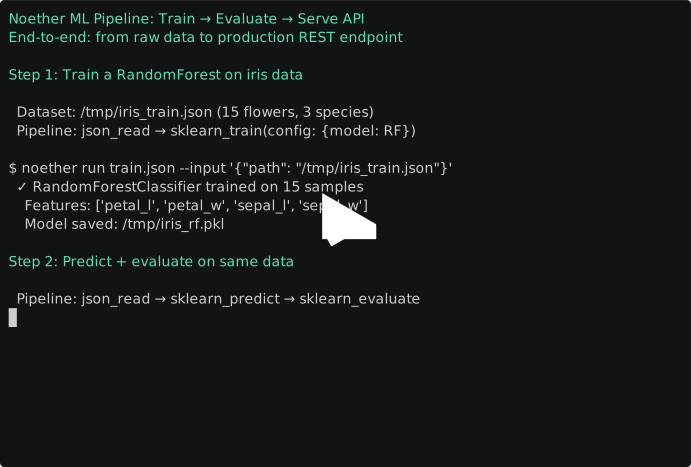
Demo 6: ML Pipeline — Train → Evaluate → Serve API
End-to-end ML: from raw data to a production REST endpoint, using only composition graphs.
Step 1: Train — read data + train a RandomForest:
{"stages": [
  {"op": "Stage", "id": "json_read"},
  {"op": "Stage", "id": "sklearn_train", "config": {
    "target": "species", "model": "RandomForestClassifier",
    "params": {"n_estimators": 10}, "save_path": "/tmp/model.pkl"
  }}
]}
$ noether run train.json --input '{"path": "/tmp/iris.json"}'
  → RandomForestClassifier trained on 15 samples
    Features: [petal_l, petal_w, sepal_l, sepal_w]
Step 2: Evaluate — predict on test data + compute metrics:
Step 3: Serve as REST API — define routes in a config file:
$ noether serve api.json --port :8080

$ curl -X POST http://localhost:8080/predict \
    -d '[{"sepal_l": 5.1, "sepal_w": 3.5, "petal_l": 1.4, "petal_w": 0.2}]'
  → {"ok": true, "output": [{"prediction": "setosa"}]}

$ curl -X POST http://localhost:8080/importance \
    -d '{"model_path": "/tmp/model.pkl"}'
  → petal_l  0.413  █████████████
     petal_w  0.307  ██████████
     sepal_l  0.256  ████████
     sepal_w  0.024  █
No Flask. No Docker. One binary, one config file. Each endpoint is a typed, type-checked composition graph.
Pip packages (scikit-learn) are auto-installed in a cached venv on first run.
How to set this up for your coding assistant
Add a CLAUDE.md (or equivalent instructions file) to your project:
## Data pipelines

This project uses Noether for data pipeline composition.
When asked to parse, transform, or analyze structured data,
use `noether compose "description"` instead of writing Python.

Available commands:
  noether compose "description"           # compose + execute
  noether compose --dry-run "description" # compose + type-check only
  noether run graph.json --input '...'    # execute a saved graph
  noether stage search "query"            # find available stages

All output is JSON with an `ok` field. Branch on ok, read data.output.
If compose fails, fall back to writing code.
The assistant discovers Noether through the ACLI protocol — every command returns structured JSON, no exit code parsing needed.
Token cost comparison
| Pipeline variations | Compose (Noether) | Generate (code) |
|---|---|---|
| 1 | ~2,150 tokens | ~600 tokens |
| 3 | ~2,450 tokens | ~1,800 tokens |
| 4 | ~2,600 tokens | ~2,400 tokens |
| 5 | ~2,750 tokens | ~3,000 tokens |
| 10 | ~3,500 tokens | ~6,000 tokens |
Noether costs more for a single pipeline but saves tokens at 4+ variations. And cached results cost 0 tokens.
Try it
# Build from source (requires Rust toolchain)
git clone https://github.com/alpibrusl/noether
cd noether && cargo build --release -p noether-cli
export PATH="$PWD/target/release:$PATH"

# Verify it works
noether stage search "parse CSV"

# Set up an LLM provider (pick one)
export VERTEX_AI_PROJECT=your-project VERTEX_AI_MODEL=gemini-2.5-flash
# or: export OPENAI_API_KEY=sk-...
# or: export ANTHROPIC_API_KEY=sk-ant-...

# Compose your first pipeline (uses the 80+ built-in stdlib stages)
noether compose "parse CSV data and count rows"

# Or run a pre-built graph
noether run --dry-run demo/benchmark/scenarios/01-type-safety/valid-graph.json
To use analytics, ML, or cloud stages (shown in demos 6-7):
The Noether Stage Registry (noether-registry) will be published as open source soon. Once available:
# Clone the stage registry
git clone https://github.com/alpibrusl/noether-registry

# Register the stages you need
noether stage add noether-registry/stages/data/sklearn_train.json
noether stage add noether-registry/stages/data/html_dashboard.json

# Or register all 390+ stages at once
cd noether-registry && ./stages/register_all.sh --activate